Exception Handling in Java - Complete Guide With Examples
We don't like exceptions, but we always have to deal with them. Exception Handling in Java is very robust and easy to use. You need to handle exceptions to make your application user-friendly and to prevent abnormal termination.
Exception may occur due to network failure, database server down, wrong data entered by user, hardware failure, etc.
What is Exception?
- Runtime errors are known as Exceptions.
- An abnormal condition during execution is called an exception.
- Exception API exists in
java.langpackage. - Exceptions are recoverable.
- Mostly generated after deployment when used by client.
- Examples: ArithmeticException, NullPointerException, etc.
What is Error?
- Errors are also generated at runtime.
- Errors are NOT recoverable.
- Examples: StackOverflowError, OutOfMemoryError, etc.
Exception Hierarchy
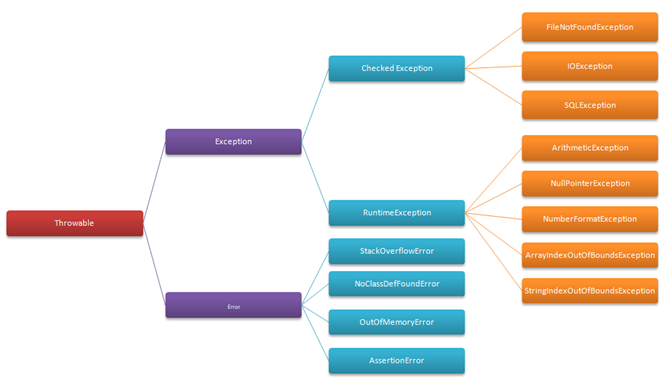
Types of Exception
There are two types:
- Checked Exception (Compile-time)
- Unchecked Exception (Runtime)
1. Checked Exception (Compile-time)
Exceptions which force you to handle them at compile time are called checked exceptions.
Any class that extends Exception except RuntimeException is a checked exception.
Example: FileNotFoundException, IOException, SQLException, ClassNotFoundException.
2. Unchecked Exception (Runtime)
Exceptions which do NOT force you to handle at compile time are unchecked exceptions.
Any class that extends RuntimeException is unchecked.
Example: ArithmeticException, NullPointerException, NumberFormatException, ArrayIndexOutOfBoundsException.
How Many Ways to Handle an Exception?
- Default Handler (JVM Handling)
- User Handling
1. Default Handler (JVM Handling)
In Java, exceptions are handled by default by JVM. But it has two problems:
- System-specific (non user-friendly) messages are generated
- Rest of the code does NOT execute
How Default Handler Works Internally?
- Creates instance of Exception class
- Calls
printStackTrace()method - Exits program using
System.exit(0)
That is why rest of the code is not executed.
2. User Handling
User handling works on top of Default Handler and solves its problems:
- User-friendly messages are generated
- Rest of the code continues to execute
User Handling is Managed By:
- try-catch block
- throws keyword
- throw keyword
- finally block
- Chaining Exception
- Custom Exception
- Log File
Java 1.7 enhancements:
- try-with-resources
- Multi-catch (single catch with multiple exceptions)
1. try-catch Block - 11 Important Rules
try is a block where you write code that may throw exception. catch handles it. It is used when deploying an application and does not propagate.
Rule 1: try cannot be used alone.
try{
}
// Compile time error
Rule 2: try with catch
try{
}catch(Exception e){
}
Rule 3: try with finally
try{
}finally{
}
Rule 4: try with catch and finally
try{
}catch(Exception e){
}finally{
}
Rule 5: Single try with multiple catch (subclass first, superclass last)
try{
}catch(ArithmeticException e){
}catch(NullPointerException e){
}catch(Exception e){
}
Rule 6: Multiple try with single catch - NOT allowed
try{
}try{
}catch(Exception e){
} // compile time error
Rule 7: No statement between try and catch
try{
}
System.out.println("Hello");
catch(Exception e){
} // compile time error
Rule 8: Return allowed inside try
try{
  return;
}catch(Exception e){
}
Rule 9: Single try with multiple finally - NOT allowed
try{
}finally{
}finally{
} // compile time error
Rule 10: Nested try-catch allowed
try{
    try{
    }catch(Exception e){
    }
}catch(Exception e){
}
Rule 11: Can be used in method, constructor, block
class Test{
    Test(){
        try{
        }catch(Exception e){}
    }
    void foo(){
        try{
        }catch(Exception e){}
    }
}
2. throws Keyword
- Used to declare an exception
- Can declare multiple exceptions separated by comma:
void show() throws IOException, SQLException{} - Used with method and constructor signature
- Used only with checked exceptions
- Can be used with try-catch together
void show() throws IOException, SQLException{
    try{
    }catch(ArithmeticException e){
    }
}
Difference between try-catch vs throws
3. throw Keyword
- Used to throw an exception explicitly inside body
- DefaultHandler also uses throw internally
- Can re-throw an exception
- Used only with exception object:
throw new ArithmeticException();
4. finally Block
- Used to execute code whether exception occurs or not
- Used for closing connections, cleanup resources
- Must be executed
- Always used with try block
5. Chaining Exception
- When one exception causes another, it is called chaining
- Used to show cause of exception
initCause()- to set underlying causegetCause()- to get actual cause- Achieved through
throwkeyword
6. Custom Exception
- You can create your own exceptions
- Can create both checked and unchecked
- Checked: extends any checked exception class
- Unchecked: extends any unchecked exception class
class DeepException extends Exception{} // Checked
class DeepException extends RuntimeException{} // Unchecked
7. Log File
- Helps maintain code easily
- Used by developer to find problems
- Part of file handling
- Achieved by
printStackTrace(PrintStream)orprintStackTrace(PrintWriter)
Frequently Asked Questions
What is an exception in Java?
Runtime errors are called exceptions. Abnormal conditions during execution. They are recoverable.
What is difference between checked and unchecked?
Checked must be handled at compile time (IOException). Unchecked extends RuntimeException and is not forced (ArithmeticException).
Difference between throw and throws?
throw throws explicitly inside method with object. throws declares in method signature and can declare multiple.
Conclusion
Exception handling is a crucial part of Java that makes your application robust and user-friendly. Always use user handling (try-catch) instead of relying on JVM default handler. Master try-catch rules, throw vs throws, and finally for interviews and production code.
Related topics: Java try-with-resources, Multi-catch in Java 7, Custom Exceptions, Java Logging
3 comments:
Thanks sir
Thank you sir , good blog
Very good post sir. Please explain semaphore concept in java
Post a Comment